
微信公众号文章下载
https://liflag.cn/html/tool/wx.html
体验地址:https://liflag.cn/html/tool/wx.html
有时候会有这种需求,将别人的公众号文章“借鉴”为自己的。这时候你会启用f12打开调试工具或者直接将网页保存下来,但微信对图片做了防盗链,只能在自己的域名下使用。所以你还需要把图片保存下来,然后去一一替换文中的图片地址。
显然这个用代码来做,比你手动去改方便很多。所以搞了一个解析微信公众号文章的网页工具,解析公众号文章下载图片和html生成本地可离线浏览的网页副本。
基于这些,甚至还可以直接把文章爬取下来保存到自己的站点中,图片保存到图床中,做一个文章采集的站点
输入地址后台进行解析 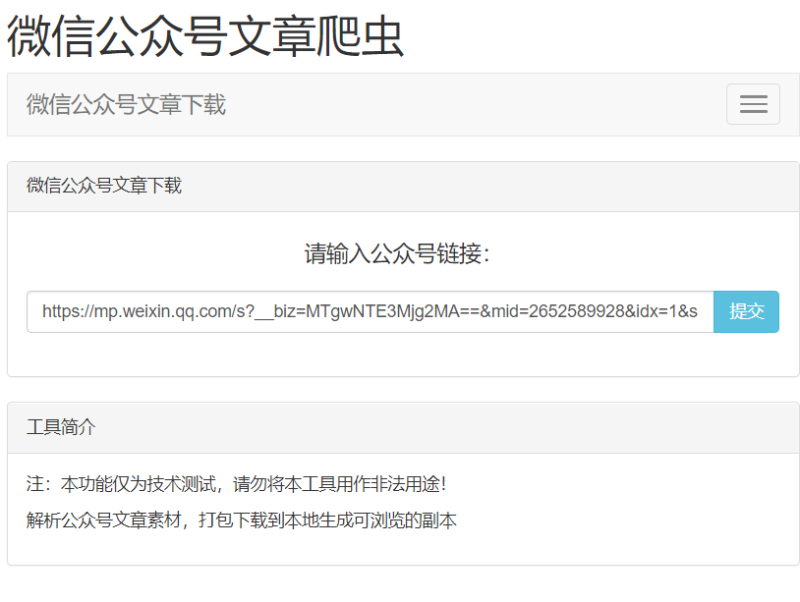
解析完成后打包到本地 
代码很简单,就用了jsoup解析url和下载图片 如下:
public static void main(String[] args) throws Exception {
String html = getHtml("微信文章url");
File txt=new File("D:/data/test.html");
if(!txt.exists()){
txt.createNewFile();
}
byte bytes[] = html.getBytes();
FileOutputStream fileOutputStream = new FileOutputStream(txt);
fileOutputStream.write(bytes);
fileOutputStream.close();
}
public static String getHtml(String requestUrl) throws IOException {
String startHtml = " " +
" " +
"";
String endHtml = "";
String endHead = "" +
"" +
" " +
" " +
" " +
" " +
" ";
Connection connect = Jsoup.connect(requestUrl);
Map header = new HashMap();
header.put("User-Agent", " Mozilla/5.0 (Android5.1.1) AppleWebKit/537. 36 (KHTML, like Gecko) Chrome/41. 0.2225.0 Safari/537. 36");
Connection data = connect.data(header);
Document doc = data.get();
Elements meta = doc.select("meta");
String viewPort = meta.get(2).toString();
Elements style = doc.select("style");
Elements elements = doc.select("img");
int i = 1;
HashMap map= new HashMap(32);
String path = null;
for (Element elements1: elements){
String a = elements1.attr("data-src");
if (a != null && !"".equals(a)){
if (map.get(a) == null || "".equals(map.get(a))){
try {
path = download(a, i, a.split("=")[1]);
} catch (Exception e) {
e.printStackTrace();
}
map.put(a,path);
i++;
}
}
}
Elements element = doc.getElementsByClass("rich_media_content");
String html = element.toString();
for (Map.Entry entry: map.entrySet()){
html = html.replace(entry.getKey(), entry.getValue());
}
html = html.replace("data-src", "src");
String resultHtml = startHtml + viewPort + style.toString() + endHead + html + endHtml;
return resultHtml;
}
public static String download(String urlString, int i, String suffix) throws Exception {
// 获取URL并构造URL
URL url = new URL(urlString);
// 打开URL连接
URLConnection con = url.openConnection();
// 定义输入流
InputStream is = con.getInputStream();
// 定义1K的数据缓冲
byte[] bs = new byte[1024];
// 读取到的数据长度
int len;
/**
*
* 设置输出的文件流并设置下载路径及下载图片名称
*/
String filename = "D:\\data\\\\test\\" + i + "." + suffix;
File file = new File(filename);
FileOutputStream os = new FileOutputStream(file, true);
// 开始读取
while ((len = is.read(bs)) != -1) {
os.write(bs, 0, len);
}
// 下载完毕,关闭所有链接
os.close();
is.close();
return filename;
}
推荐阅读:

1 个月前
导演: 大卫·博伦斯坦 / 帕维尔·塔兰金编剧: 大卫·博伦斯坦主演: 帕维尔·塔兰金类型: 纪录片制片国家/地区: 丹麦 / 捷克 / 德国语言: 俄语上映日期: 2025-01-25(圣丹斯电影节) / 2025-03-22(丹麦)片长: 90分钟又名: 无名氏先生(港)IMDb: tt34965515 当俄罗斯对乌克兰发起全面入侵后,俄罗斯内陆地区的小学纷纷变成了战争征兵的阵地。一位勇敢的教师面临着在充斥着宣传与暴力的体系中工作的道德困境,他选择卧底拍摄,记录下自己所在学校里真实发生的一切。 在乌拉尔山脉的家乡,生性开朗的帕夏在自己儿时就读的那所小学任教,他是个不墨守成规的老师。然而,2022 年俄罗斯对乌克兰发起的入侵改变了一切。一夜之间,他所热爱的学校与社区从一个专注教育与自我表达的地方,变成了充斥着军事化思想与国家意识形态的场所。不久后,他的学生及他们的家人被征召入伍,帕夏不得不开始思考:一个人究竟能做些什么? 《反对普京的无名先生》历经两年秘密拍摄而成,它深刻描绘了当下俄罗斯的生活图景,以及当国民深爱的国家落入一位迫使它变成自己无法接受的模样的统治者手中时,民众所面临的艰难抉择,令人难以忘怀。 在线观看 《反对普京的无名先生》HD完整版免费在线播放 - 纪录片 - 飘花影院 《反对普京的无名先生》HD中字在线播放_记录免费观看-155电影
3 个月前
稳定,便宜实用,流量大,

8 个月前
免登录·匿名AI助手 ——即刻体验,零收费畅聊 使用链接: https://panda.tw/yu_ai/ 核心 ✓特点匿名:注册/登录,不收集个人信息 ✓即问即答:打开网页直接输入问题,级响应 ✓隐私保护:对话内容不关联用户身份,无痕迹留存 ✓多端装备:手机/电脑浏览器一键访...

9 个月前
关于开源,云搜工具箱 我们计划将工具箱的全部功能开源,具体原因如下: 一、目前服务器配置为4G内存、4核CPU,部分功能依赖于实时爬取和调用第三方API。随着用户数量增加,服务器负载逐渐升高,导致有时会过载甚至宕机,需要频繁的重启服务器,影响了系统的稳定性。为了确保工具箱的持续可用, 对互联网共享精神的坚守 。 二、出于对互联网共享精神的尊重和对初...

9 个月前
B站评论查询,人物画像,大数据溯源【熊猫云搜】 使用链接: https://tool.panda.tw/bilireply https://www.panda.tw/ 在当今视频内容不断丰富、互动日益频繁的时代,B站(哔哩哔哩)作为年轻人聚集的创新社区,用户的评论不仅反映着观众的真实想法,也成为内容创作者了解受众、优化内容的重要依据。为了帮助用户...

9 个月前
B站弹幕查询,人物画像,大数据溯源【熊猫云搜】 使用地址: https://tool.panda.tw/bili_userdanmu https://www.panda.tw/ 在数字娱乐的浪潮中,弹幕已成为B站(哔哩哔哩)视频互动的核心特色,赋予视频独特的趣味性与参与感。弹幕不仅让观众表达即时感受,也营造出热烈的社区氛围。然而,随着弹幕数量...

9 个月前
B站直播间,弹幕查询,人物画像,大数据溯源【熊猫云搜】 使用链接: https://tool.panda.tw/bili_livedanmu https://www.panda.tw/ 在当今直播娱乐盛行的时代,弹幕已成为B站(哔哩哔哩)直播互动的重要方式。实时弹幕不仅让观众表达情感、分享观点,也为主播营造出热烈的互动氛围。然而,随着直播弹幕数量...

9 个月前
哔哩哔哩高清视频解析下载,视频所有弹幕解析【B站视频解析】 使用链接: https://tool.panda.tw/bili_video https://www.panda.tw/ 🎥【轻松下载哔哩哔哩视频】保存高清内容,随时随地掌控精彩!🎥 想要将喜欢的哔哩哔哩(B站)视频保存到本地?我们为你提供简便的操作指...

 臺灣ICP000000001
sitemap
臺灣ICP000000001
sitemap
You can ask me anything about tech, tools, or site content.



@fkmY9h1M:您好,贵站已经添加!
提交链接
类别:在线工具 名称:喵喵工具集 地...
提交链接
您好站长,申请贵站收录 网站名称:...
提交链接
@5ZN2liXC:您好,已经添加了哦!...
提交链接
您好站长,申请贵站收录 网站名称:...
提交链接
@5ZN2liXC:您好,已经添加了哦!...
提交链接
类别:博客站点 名称:小报童专栏 地...
提交链接
类别:在线工具 名称:夸克搜 地址:...
提交链接